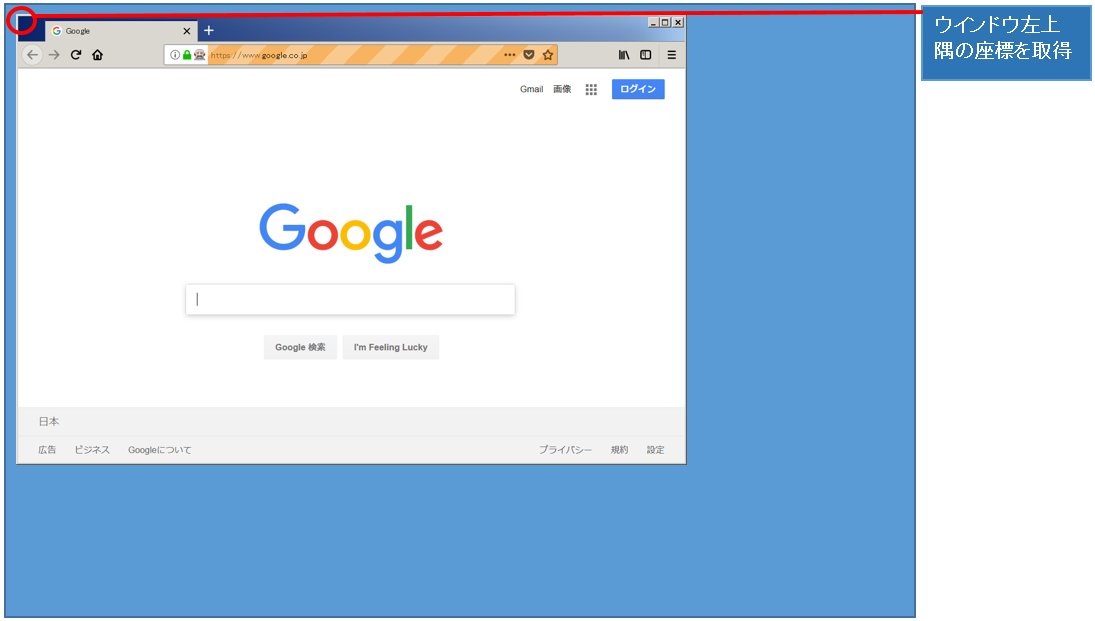
「position」はウインドウ(ブラウザ)の座標位置を取得します。取得する座標位置はウインドウ左上隅になります。
説明
サンプル
require 'selenium-webdriver'

# Firefoxを起動
driver = Selenium::WebDriver.for(:firefox)
# Googleページに移行
driver.get('https://www.google.co.jp/')
#カレントウィンドウの座標(左上隅の座標)を取得
coordinate = driver.manage.window.position
#取得した座標を表示
print(coordinate)
※selenium version 4.1.0で動作確認をしています
実行結果
#<struct Selenium::WebDriver::Point x=4, y=4>
動画デモ
※字幕をONにすると解説のテロップが表示されます※
Fatal error: Uncaught Google_Service_Exception: Error calling GET https://www.googleapis.com/analytics/v3/data/ga?ids=ga%3A138132118&start-date=7daysAgo&end-date=yesterday&metrics=ga%3Apageviews&dimensions=ga%3ApageTitle%2C+ga%3ApagePath&sort=-ga%3Apageviews&max-results=1000: (404) <!DOCTYPE html>
<html lang=en>
<meta charset=utf-8>
<meta name=viewport content="initial-scale=1, minimum-scale=1, width=device-width">
<title>Error 404 (Not Found)!!1</title>
<style>
*{margin:0;padding:0}html,code{font:15px/22px arial,sans-serif}html{background:#fff;color:#222;padding:15px}body{margin:7% auto 0;max-width:390px;min-height:180px;padding:30px 0 15px}* > body{background:url(//www.google.com/images/errors/robot.png) 100% 5px no-repeat;padding-right:205px}p{margin:11px 0 22px;overflow:hidden}ins{color:#777;text-decoration:none}a img{border:0}@media screen and (max-width:772px){body{background:none;margin-top:0;max-width:none;padding-right:0}}#logo{background:url(//www.google.com/images/branding/googlelogo/1x/googlelogo_c in /home/users/1/monda-muki/web/seleniumqref.com/google-api-php-client-1-master/src/Google/Http/REST.php on line 110