
「frameToBeAvailableAndSwitchToIt」を実行することで指定したフレームが利用できる状態になるまで待機することが出来ます。
下記サンプルではまず初めに、「WebDriverWait」コンストラクタの引数に対象driverと待ち時間(秒数)を指定して、インスタンスを作成しています。
次に作成されたインスタンスに対して「until」メソッドを実行しています。「until」メソッドは、引数に指定された条件が真になるまで待機するメソッドです。引数に指定するメソッドの「frameToBeAvailableAndSwitchToIt」は、「ExpectedConditions.frameToBeAvailableAndSwitchToIt」の形で用いることでフレームを切り替えることが出来ます。また、「frameToBeAvailableAndSwitchToIt」は引数にフレーム参照番号を設定する必要があり、参照番号によってフレームを指定していきます(フレーム参照番号はフレームそれぞれに設定される番号で、<frameset>内に定義された順番に0から割り当てられます)。つまり総合すると、取得したフレームに切り替えて利用出来るまで待つということになります。もしフレームが「WebDriverWait」コンストラクタで指定した待ち時間を越えても、期待値の状態にならない場合はexceptionが発生します。
※条件を指定して待機についてはこちら
説明
◆メソッド
  ・public static ExpectedCondition<WebDriver>
              frameToBeAvailableAndSwitchToIt(int frameLocator)

◆使用形態
  ・ExpectedConditions.frameToBeAvailableAndSwitchToIt(frameLocator)
◆備考
  ・引数で指定した(フレーム参照番号の)フレームが利用できるまで待機する
  ・最大待機時間を越えてもフレームが利用出来る状態にならない(選択したフレームが存在しない)
   場合はExceptionが発生する
◆関連項目
  ・Alertが表示されるまで待機する
  ・要素がチェックONまたはチェックOFFになるまで待機する
サンプル
import java.time.Duration;

import org.openqa.selenium.WebDriver;
import org.openqa.selenium.chrome.ChromeDriver;
import org.openqa.selenium.support.ui.ExpectedConditions;
import org.openqa.selenium.support.ui.WebDriverWait;

public class WebTest{
  public static void main(String[] args){
	//Chrome制御のためChromeDriverのパスを指定
	System.setProperty("webdriver.chrome.driver",
			                            "D:\\AutoTest\\chromedriver.exe");
	//Chromeを起動する
	WebDriver driver = new ChromeDriver();
	try{
      //指定したURLに遷移する<図1>
      driver.get("file://D:/AutoTest/frameToBeAvailable_main.html");
	  //指定したdriverに対して最大で10秒間待つように設定する
      Duration waitTime = Duration.ofSeconds(10);
      WebDriverWait wait = new WebDriverWait(driver, waitTime);
      //フレームの参照番号(0から始まる)でフレームを選択する
      int frameLocator = 0;
      //指定されたフレームが利用出来るまで待機する
      WebDriver frame = wait.until(ExpectedConditions.
                  frameToBeAvailableAndSwitchToIt(frameLocator));
      //取得したフレームのソースを表示
      System.out.println(frame.getPageSource());
	}catch(Exception e){
      e.printStackTrace();
	}
  }
}
※selenium version 4.1.4で動作確認をしています
実行結果
<!DOCTYPE html><html xmlns="http://www.w3.org/1999/xhtml" lang="ja"><head></head><body bgcolor="red" text="#ffffff">
        <b>フレーム1</b>

</body></html>
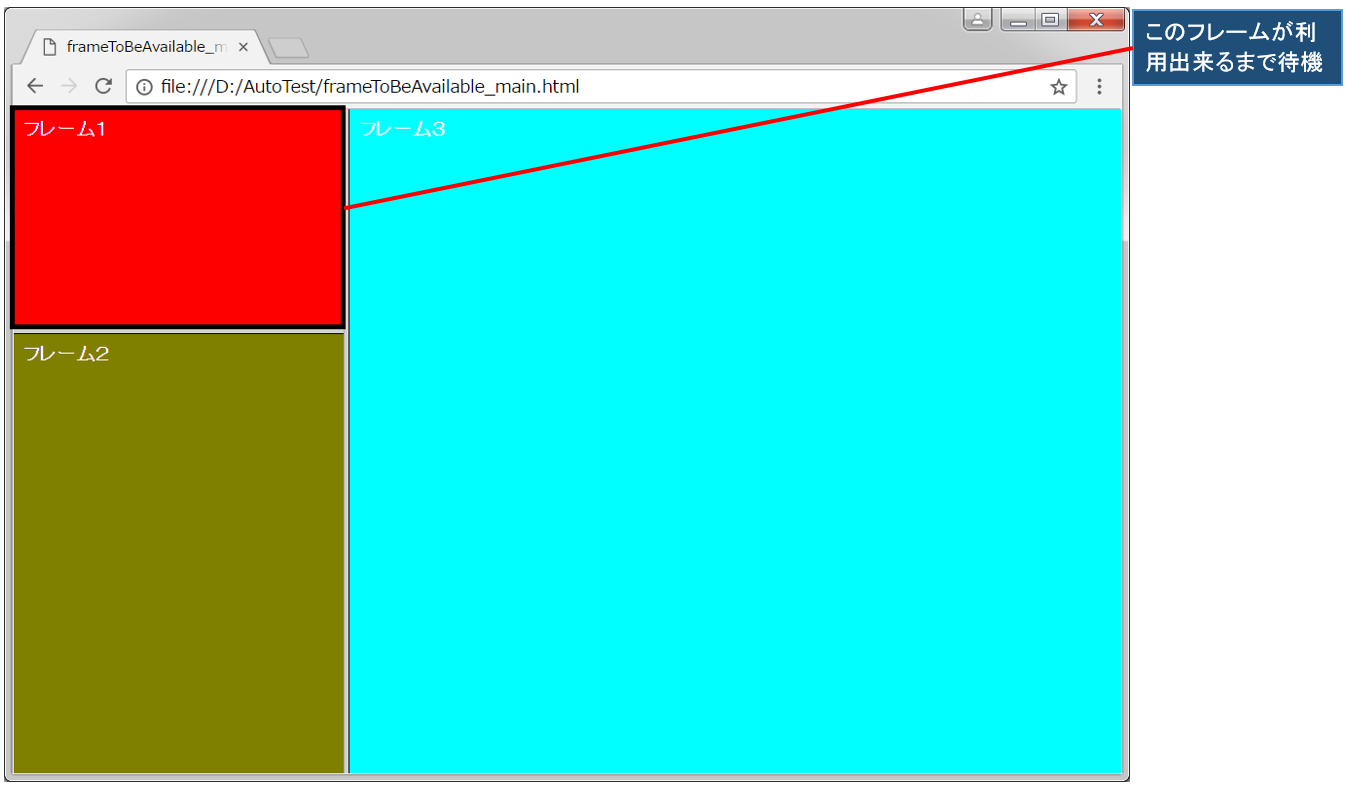
frameToBeAvailable_main.html<図1>
<!DOCTYPE html>
<html lang="ja">
    <head>
        <title>frameToBeAvailable_main</title>
    </head>
    <frameset cols="30%, 70%">
        <frameset rows="180, *">
            <frame src="frameToBeAvailable_1.html">
            <frame src="frameToBeAvailable_2.html">
        </frameset>
        <frame src="frameToBeAvailable_3.html">
    </frameset>
</html>
frameToBeAvailable_1.html(フレーム1)
<!DOCTYPE html>
<html lang="ja">
    <body bgcolor="red" text="#ffffff">
        <b>フレーム1</b>
    </body>
</html>
frameToBeAvailable_2.html(フレーム2)
<!DOCTYPE html>
<html lang="ja">
    <body bgcolor="olive"  text="#ffffff">
        <b>フレーム2</b>
    </body>
</html>
frameToBeAvailable_3.html(フレーム3)
<!DOCTYPE html>
<html lang="ja">
    <body bgcolor="aqua"  text="#ffffff">
        <b>フレーム3</b>
    </body>
</html>